// Windows Media Toolkit
MediaRip
v2.0 RC1Paste a link, pick a format, press download. MediaRip pulls audio and video from YouTube, X, and SoundCloud into one fast desktop queue — no converter websites, no ads, no browser extensions.
Free 27.5 MB portable ZIP Windows 10 / 11 No ads or bundleware SHA-256 checksum published
- YouTube · X · SoundCloud
- MP3 & MP4 output
- Playlists & albums
- Batch queue
- Quality & bitrate control
- Embedded artwork
// Why MediaRip
Stop fighting converter websites
Grabbing one song or clip from the web usually means an ad-choked converter site, a sketchy browser extension, or a command-line tool with forty flags. It works — until the site changes, the tab crashes mid-download, or you need a whole playlist instead of one file.
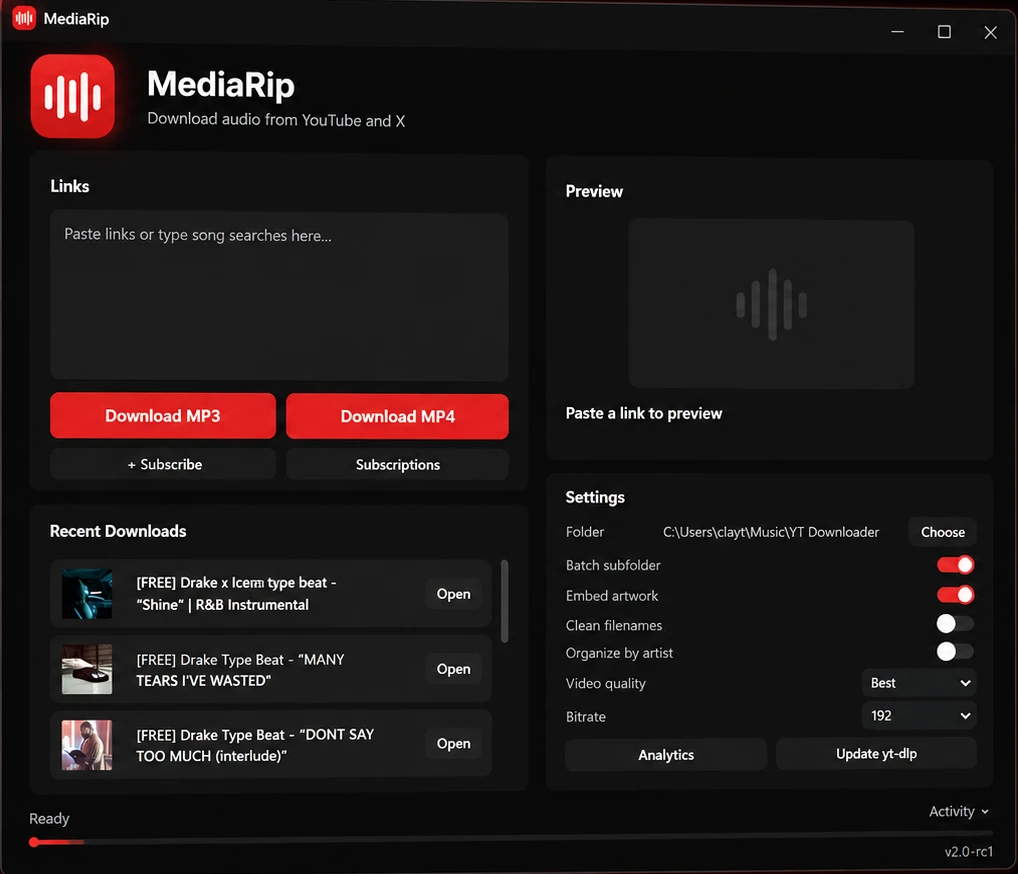
MediaRip puts the entire job in one clean desktop app. Paste links (or type a search), preview what you found, choose audio or video, and let the queue run — single tracks, full albums, playlists, or big batches. Your library comes out organized, tagged, and ready to play.
Download queue
3 items
- Late Nights (Full Album) MP3 · 320done ✓
- Studio Session — Live Cut MP4 · 1080p64%
- Road Trip Playlist · 42 tracks MP3 · 192queued
44 of 47 downloads complete · queue running
// Key Features
One app for the whole job
Everything between “I found something” and “it’s in my library” — fetching, converting, tagging, and organizing in a single desktop tool.
Paste anything
Single videos, songs, full albums, playlists — from YouTube, X (Twitter), or SoundCloud. Drop in one link or a whole list and MediaRip sorts out the rest.
Audio or video, your call
One click for MP3, one for MP4. Set video quality and audio bitrate per download, so the file you get matches how you plan to use it.
Queues that run themselves
Line up dozens of downloads and walk away. The batch queue engine manages ordering and speed, with live progress and per-item results.
A library that stays organized
Embedded artwork, cleaned-up filenames, and optional per-artist subfolders mean your music folder still makes sense a year from now.
Fast by default
Hardware-accelerated encoding and a rebuilt v2 queue engine keep conversions quick — the slow part should be your internet, not the app.
An engine that keeps up
Sites change constantly. MediaRip is built on the proven yt-dlp engine and updates it with one click from inside the app — no reinstall.
// How It Works
From link to library in four steps
- 01
Paste
Drop one or more links into the Links box — or just type a song search and let MediaRip find it.
- 02
Preview
MediaRip analyzes each link and shows you what it found before anything downloads.
- 03
Choose format
MP3 for your library or MP4 for the archive, with quality and bitrate set the way you want them.
- 04
Download
The queue takes over — batches, playlists, and albums land in your organized library, tagged and ready.
// Changelog
What's new in v2.0 RC1
v2.0 RC1
released 2026-06-13
- + Complete UI overhaul
- + New batch queue engine
- + Hardware-accelerated encoding
- + Preset import/export
Every release lands on the Release Feed.
// Download
Get MediaRip 2.0 RC1
Free for Windows 10 and 11. Portable release candidate — unzip and run.
Portable ZIP
27.5 MBNo installer — extract the ZIP anywhere and run MediaRip directly.
Download MediaRip for WindowsSHA-256 6d51b6b58da52de04758f34de71139ecee0ba9907509bcd3133202da2b3540b9
This binary is unsigned. Windows SmartScreen may display an unknown-publisher warning; verify the SHA-256 checksum before running a downloaded file. Download only media you have the rights to save.
// Keep Exploring
Continue exploring the workshop
More desktop tools built in the same workshop — take a look.