// Windows Privacy Tool
MetaWipe
v3.2.0Photos remember where you took them. Documents remember who wrote them. MetaWipe finds that hidden metadata, strips it into clean copies, and verifies the result — entirely on your PC.
Free 26.0 MB installer Windows 10 / 11 No cloud uploads SHA-256 checksums published
- Local-only processing
- Windows 10 / 11
- Supports 20+ metadata types
- Batch cleaning
- Automatic verification
- Watch Folders
// The Problem
Your files say more than you think
Every file you share can say more than you meant it to. A photo can carry the GPS coordinates of your home, the exact phone that took it, and the second it was taken. A Word document or PDF can name its author, the software that produced it, and its revision history. Audio and video embed tags, timestamps, and location data of their own.
All of it travels with the file when you email it, upload it, or post it — invisible in the preview, trivial to read with free tools. MetaWipe runs entirely on your Windows PC: it scans supported metadata, creates cleaned copies using the rules you choose, and verifies those copies against its supported checks. Results describe what MetaWipe detected and checked, not an absolute guarantee that every possible private signal has been removed — and your originals are never touched.
IMG_2047.jpg
4.2 MB
- GPS Position 37.7749° N, 122.4194° W HIGH
- Device Apple iPhone 15 Pro HIGH
- Author / Owner Clay R. HIGH
- Date Taken 2026-06-14 09:41:07 MED
- Software Adobe Lightroom 7.2 LOW
- Serial Number F2LX3G7HQ1J9 MED
⚠ 23 hidden metadata fields in one photo
// Key Features
Built for real privacy
Everything between “I have files to share” and “these are safe to send” — inspect, clean, verify, and package without leaving your PC.
Know before you share
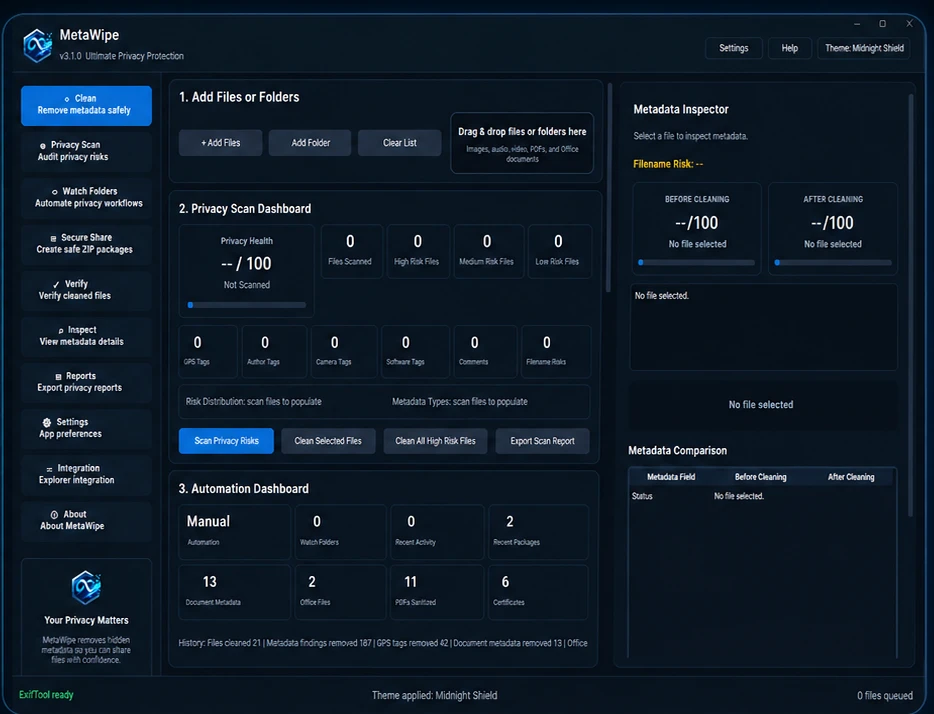
Scan one file or an entire folder tree and see every supported metadata field it is carrying — GPS, author, device, timestamps — scored by privacy risk.
Clean copies, untouched originals
Strip supported location, device, author, timestamp, and edit-history fields in one pass. MetaWipe writes cleaned copies and never modifies the source file.
Hundreds of files in one pass
Queue whole folders and clean everything in a single operation, with per-file results — no opening files one by one, no repetitive clicking.
Proof, not promises
Every cleaned copy is automatically re-inspected. A before-and-after comparison shows exactly what MetaWipe’s supported checks still detect.
Reports you can hand over
Generate a Privacy Cleaning Summary describing what was processed, detected, removed, and verified — for clients, recordkeeping, or peace of mind.
Share-ready in one click
Bundle cleaned copies, reports, and a summary into a single ZIP that is safe to send, while the originals stay exactly where they were.
// How It Works
Four steps to a clean file
- 01
Scan
Drop in a file or point MetaWipe at a folder. It reads each item and reports the metadata it found — location, author, device, timestamps, and more.
- 02
Review
Inspect exactly what each file is carrying in the Metadata Inspector, with risks flagged, before anything is changed.
- 03
Clean
Create cleaned copies using the privacy rules you choose while the original files stay untouched.
- 04
Verify & Share
MetaWipe re-checks every cleaned copy and reports what its supported verification still detects — then packages the results for sharing.
// Changelog
What's new in v3.2.0
v3.2.0
released 2026-07-15
- + Add files and scan supported metadata automatically
- + Review privacy risks in the contextual Metadata Inspector
- + Create cleaned copies while preserving originals
- + Automatically verify cleaned results
- + Use Automation, Watch Folders, and Secure Share packages
- + Generate contextual reports and Privacy Cleaning Summaries
- + Switch between simplified Light and Dark themes
- + Improved accessibility, scaling, and visual polish
Every release lands on the Release Feed.
// Download
Get MetaWipe 3.2.0
Free for Windows 10 and 11. Runs entirely on your PC — nothing is uploaded.
Installer
26.0 MBRecommended — sets up Start-menu shortcuts and clean uninstall.
Download MetaWipe for WindowsInstaller SHA-256 5b2b04cd3b642909d59b7808e71c49930ac95413eed1edf30e30cb8dc51360fd
Portable
33.3 MBNo install required — unzip and run from anywhere, even a USB stick.
Download Portable ZIPPortable ZIP SHA-256 31ee174ab5d87ca5ca2d8eab613c8133ef52ffddc9fa28f14ec3ee59efd9dfea
These binaries are unsigned. Windows SmartScreen may display an unknown-publisher warning; verify the SHA-256 checksum before running a downloaded file.
// Keep Exploring
Continue exploring the workshop
More desktop tools built in the same workshop — take a look.