// Windows Disk Analytics
StorageIQ
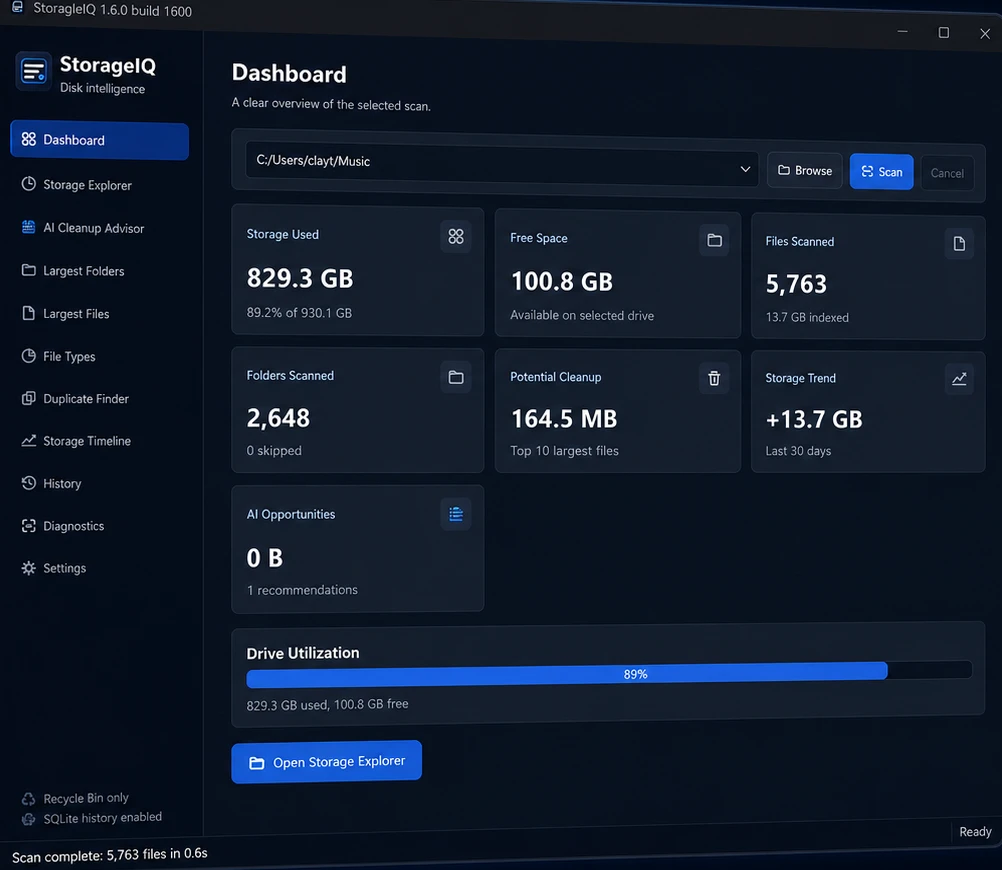
v1.6.0 RC1Your drive is nearly full and nothing tells you why. StorageIQ scans it in seconds and turns every folder, file type, and duplicate into numbers you can act on.
Free 45.2 MB portable ZIP Windows 10 / 11 Scans stay on your PC SHA-256 checksum published
- Fast native scanning
- Largest folders & files
- Duplicate Finder
- File-type breakdown
- Storage Timeline
- AI Cleanup Advisor
// The Problem
Where did 800 gigabytes go?
Windows will tell you the drive is 89% full. It will not tell you that a third of it is forgotten video renders, that your downloads folder quietly doubled since spring, or that the same photo library exists in three places. So you delete a few files at random, buy another drive, and the problem comes back.
StorageIQ replaces the guesswork with a dashboard. It scans a drive or folder in seconds, ranks the largest folders and files, breaks usage down by file type, hunts duplicates by content, and tracks how usage moves over time — then its Cleanup Advisor turns all of that into specific, reviewable suggestions. Nothing is deleted behind your back: cleanups go to the Recycle Bin, and every scan stays on your PC.
C:\ — 829 GB used
89% full
- Video projects 312 GB · 38%
- Photo library 204 GB · 25%
- Games & apps 148 GB · 18%
- Duplicates found 96 GB · 12%
- Everything else 69 GB · 7%
↯ 96 GB recoverable — 1,204 duplicate files flagged
// Key Features
Storage analytics, not another file manager
StorageIQ treats your drive like a dataset — scan it, rank it, chart it, and act on it.
Answers in seconds
Point StorageIQ at a drive or folder and get a full dashboard — usage, free space, files scanned, and cleanup potential — from a scan measured in seconds, not minutes.
Explore instead of guessing
The Storage Explorer lets you walk your drive by size — drill from “C: is full” down to the exact folder responsible in a few clicks.
Find the space hogs
Largest Folders and Largest Files views rank the biggest offenders on the drive, so the first ten minutes of cleanup recover the most space.
Hunt down duplicates
The Duplicate Finder compares file content — not just names — to surface the copies of copies quietly eating your drive.
Watch usage over time
The Storage Timeline tracks how consumption changes — spot the folder that grew 13 GB last month before it becomes 130.
Cleanup advice, not chores
The AI Cleanup Advisor turns scan data into specific recommendations you review and approve — and deletions go to the Recycle Bin, never straight to oblivion.
// How It Works
From full drive to free space
- 01
Select
Choose a drive or any folder — your whole C: drive or just the projects directory.
- 02
Scan
The native scanner indexes thousands of files in seconds and builds your storage dashboard.
- 03
Explore
Drill into largest folders, file types, duplicates, and trends until the missing gigabytes have names.
- 04
Clean
Review the Cleanup Advisor’s suggestions and reclaim space — everything removable goes to the Recycle Bin first.
// Changelog
What's new in v1.6.0 RC1
v1.6.0 RC1
released 2026-06-12
- + Duplicate file detection
- + Scheduled scan support
- + Export reports to HTML
Every release lands on the Release Feed.
// Download
Get StorageIQ 1.6.0 RC1
Free for Windows 10 and 11. Scans run locally — your file data never leaves your PC.
Portable ZIP
45.2 MBNo installer — extract the ZIP anywhere and run StorageIQ directly.
Download StorageIQ for WindowsSHA-256 f164cda77a103e4ac8f12b6fe7c0cd287a8baada00aa1fc546e24fd0dd382eb7
This binary is unsigned. Windows SmartScreen may display an unknown-publisher warning; verify the SHA-256 checksum before running a downloaded file.
// Keep Exploring
Continue exploring the workshop
More desktop tools built in the same workshop — take a look.